
This step-by-step guide is designed to help Online Travel Agents (OTAs) and distributors integrate their booking systems with TuriTop using the international OCTO (Open Connectivity for Tour Operators) standard.
For a full breakdown of all available endpoints, parameters, and specifications, please refer to the Official TuriTop OCTO API Documentation.
Reseller Mode & Bearer Token Suffixes
In TuriTop's OCTO implementation, switching between your own catalog and your resellers' inventory is managed dynamically using a Bearer Suffix on your API key.
When working with resale products, you need to append a suffix (/<supplier_short_id>, for the products of a specific provider, or /* to list all resale products) directly to your Authorization header.
You can use our classic API to work with our Marketplace: discover providers, recover their products, and send/accept resale requests.
The 3 Modes
1. Supplier Mode (Your Own Catalog)
Use your standard API token with no suffix. This mode queries and manages products created directly inside your own TuriTop account.
curl -H "Authorization: Bearer abc123" \
     https://app.turitop.com/octo/products
2. Reseller Mode (Single Supplier)
Append /<supplier_short_id> (e.g., /K3) to scope your requests strictly to a single supplier's accepted resales. The supplier's short_id is the code displayed when a resale request is accepted in the TuriTop Marketplace.
curl -H "Authorization: Bearer abc123/K3" \
     https://app.turitop.com/octo/products
3. Reseller Mode (All Accepted Resales)
Append /* to automatically fetch and flatten ALL accepted resales across all your suppliers at once (excluding your own products).
curl -H "Authorization: Bearer abc123/*" \
     https://app.turitop.com/octo/products
How Endpoints Behave by Suffix
| Endpoint | Behavior by Bearer Suffix Mode |
GET /supplier |
No suffix: Returns your own supplier identity.
|
GET /products |
No suffix: Returns your own products.
|
GET /products/{id} |
Returns product only if reachable under the active mode. Returns 403 SUPPLIER_NOT_REACHABLE on suffix mismatch, or 403 PRODUCT_NOT_REACHABLE if out of scope.
|
|
|
With suffix: Resolves real supplier via the product's resale relationship.
Without suffix: Queries your own product. |
POST /bookings |
No suffix: Persists booking as direct/own supplier booking.
(Accepts |
|
|
Action allowed if caller owns the booking either as supplier or as reseller. |
GET /bookings |
Returns bookings owned as supplier or reseller, restricted by active suffix mode. |
GET /bookings/{uuid} |
Returns the booking if caller matches supplier or reseller ID (otherwise 404).
|
Sandbox Testing
For development and initial endpoint testing, you can execute all your Sandbox tests against our designated test account: D1 - DP Test . For more information, consult our support team at help@turitop.com.
Recommended OTA Resale Flow
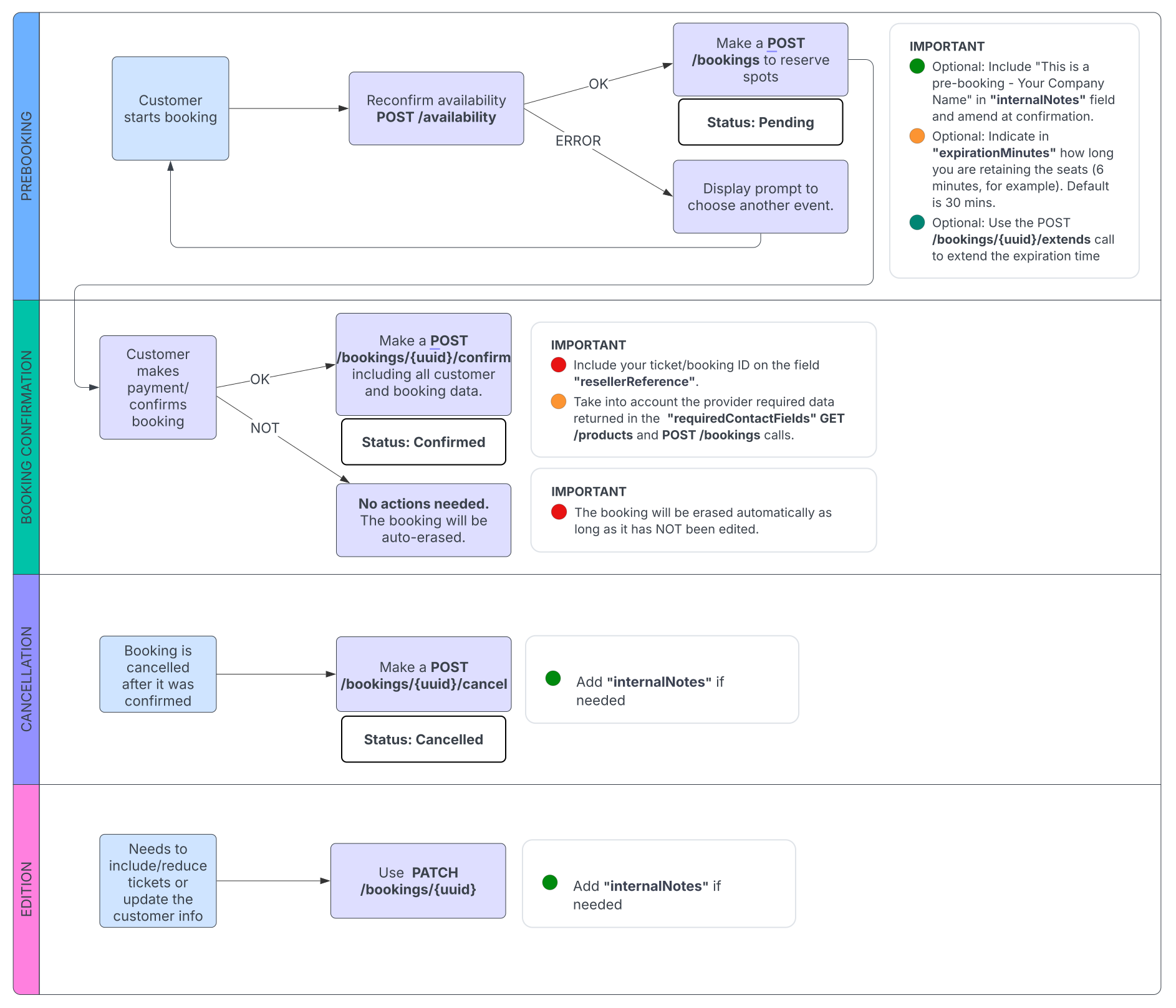
To ensure a seamless integration, follow the recommended lifecycle for inserting and managing reseller bookings via OCTO:
1. Catalog & Availability Sync
GET /products: Fetch the list of available products.POST /availability/calendar: Retrieve overall calendar availability to populate the date picker and cache availability data.
2. Booking Flow (Pre-booking & Confirmation)
POST /availability: Reconfirm availability of a specific time slot/event and retrieve the requiredavailabilityId.POST /bookings: Save the spots by inserting a pre-booking (creates a temporary booking with status"Pending").POST /bookings/{uuid}/confirm: Confirm the booking and update the customer contact details and booking data, including your external ticket ID in theresellerReferencefield (status updates toCONFIRMED).(optional) If the booking is not confirmed (payment fails or is abandoned), no action is required. The provisional hold will expire automatically after 30 minutes (by default) or the time you have set under the
expirationMinutesfield.
3. Optional Endpoints & Management:
Extend Hold —
POST /bookings/{uuid}/extend: Extend the reservation hold time if the user needs more time to complete checkout (default expiration is 30 minutes, or customizable viaexpirationMinutes).Modify Booking —
PATCH /bookings/{uuid}: Update customer details or adjust ticket quantities when changes occur.Cancel Booking —
POST /bookings/{uuid}/cancel: Cancel a confirmed booking and release seats back to inventory. IncludeinternalNotesif needed.
Live Certification
If you are already OCTO Certified, you don't need to undergo full manual testing from scratch. Simply complete the required test scenarios and verify your compliance.
1. Execute Certification Scenarios
Perform the following 3 tests against the account L797 - Live Testing Account:
Scenario A (Hold & Expire): Create a pre-booking and allow the hold time to expire.
Scenario B (Create & Confirm): Create a booking, process payment, and formally call
POST /bookings/{uuid}/confirm.Scenario C (Create, Confirm & Cancel): Create, confirm, and subsequently cancel a booking via
POST /bookings/{uuid}/cancelto verify seat release.
2. Verify Compliance
Once you have completed the test scenarios, please contact our team at help@turitop.com and provide the booking IDs generated for each scenario. This will allow us to review the booking flows and confirm that all checks have been completed successfully.
Additionally, verify that your implementation complies with the official OCTO standards using the OCTO Certification Verifier.
Production Launch
Once certified:
-
Marketplace Requests: The final step will be sending invitations to the suppliers for reselling their products through the Marketplace. They will need to accept this request for you to insert bookings for them. Furthermore, it’s advised to start with max. 5 products of suppliers that have a close relationship with you, informing them in advance that they will be beta testers, and then progressively start reselling more activities.
You can check out this article to learn how to set up reselling in your TuriTop panel.
Commissions: TuriTop doesn’t need to know the commission agreement between the OTA and the supplier. Therefore, when making the resell petition, you can type 0% as commission and handle it all outside TuriTop.
Go Live: Start using your production key with
/*or/<supplier_short_id>suffixes to book real inventory.
Support & Resources
Official OCTO API Documentation: https://developers.turitop.com/octo/
OCTO Certification Verifier: https://certify.octo.travel/verify
TuriTop OCTO API Support: help@turitop.com
Comments
0 comments
Please sign in to leave a comment.